문제 :
다음과 같이 정수, 제곱, 제곱근의 값을 형식에 맞추어 출력하는 프로그램을 작성하라.
필드의 간격은 총 15칸이고 제곱근의 유효 숫자는 총 3자리로 한다.
빈칸은 모두 underline(_) 문자로 삽입한다.
실행 결과 :
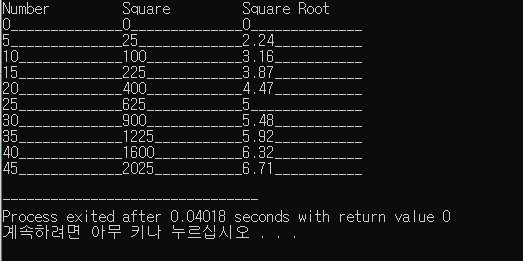
목적 및 힌트 :
cout으로 포맷 출력 응용 연습
제곱근을 구하려면
코드 :
| 1 2 3 4 5 6 7 8 9 10 11 12 13 14 15 16 17 18 19 20 21 22 23 24 25 | #include |
설명 :
포맷 함수와 포맷 플래그, 조작자에 대해 알고 있으면 문제를 푸는데 어려움이 없습니다.
포맷 플래그와 조작자에 대한 내용은 너무 광범위 해 링크로 대체하겠습니다.
포맷 플래그 :
http://www.cplusplus.com/reference/ios/ios_base/fmtflags/
[ios_base::fmtflags - C++ Reference
public member type Type for stream format flags Bitmask type to represent stream format flags. This type is used as its parameter and/or return value by the member functions flags, setf and unsetf. The values passed and retrieved by these
www.cplusplus.com](http://www.cplusplus.com/reference/ios/ios_base/fmtflags/)
조작자 :
http://www.cplusplus.com/reference/library/manipulators/
[manipulators - C++ Reference
www.cplusplus.com](http://www.cplusplus.com/reference/library/manipulators/)